· system design · 11 min read
Server-Driven UI in 22 lines of TypeScript
Move the layout decision out of the clients and into the API. One JSON contract; every client renders it in its own programming language or framework.

Neciu Dan
Hi there, it's Dan, Senior Engineering Manager at Perk, host of Señors at Scale - a podcast for Senior Engineers, Organizer of ReactJS Barcelona meetup, and international speaker, I'm here to share insights on combining
technology and education to solve real problems.
I write about startup challenges, tech innovations, and the Frontend Development.
Subscribe to join me on this journey of transforming education through technology. Want to discuss
Tech, Frontend or Startup life? Let's connect.

I worked at Glovo (A food delivery app from Europe) on the team that owned the store page. Each restaurant chain we onboarded had different needs: some needed a list of dishes, others a grid, and some required promo content to land in specific positions on the screen.
Every variation was a 3-PR effort across web, iOS, and Android. (Which meant 3 different teams had to do it.)
And each team had to go through different cycles until their change hit production. Web had CI/CD with instant deploys to stage and weekly trains to prod, but mobile apps had 2-week trains + the variable review process from the app stores.
And the wait was dreadful.
Luckily, we weren’t the only ones with this problem, and Airbnb devised a cool pattern teams can use to solve this. Check here the Airbnb team talking about it at Kotlin Conf
That pattern is Server-Driven UI. The backend sends a JSON describing what to render, and the client maps each node to a component it already knows how to draw.
I gave a talk on this at CityJS London a few weeks back, which received a positive response; this article is a more in-depth look at how to build this pattern.
What if the API picked the layout?
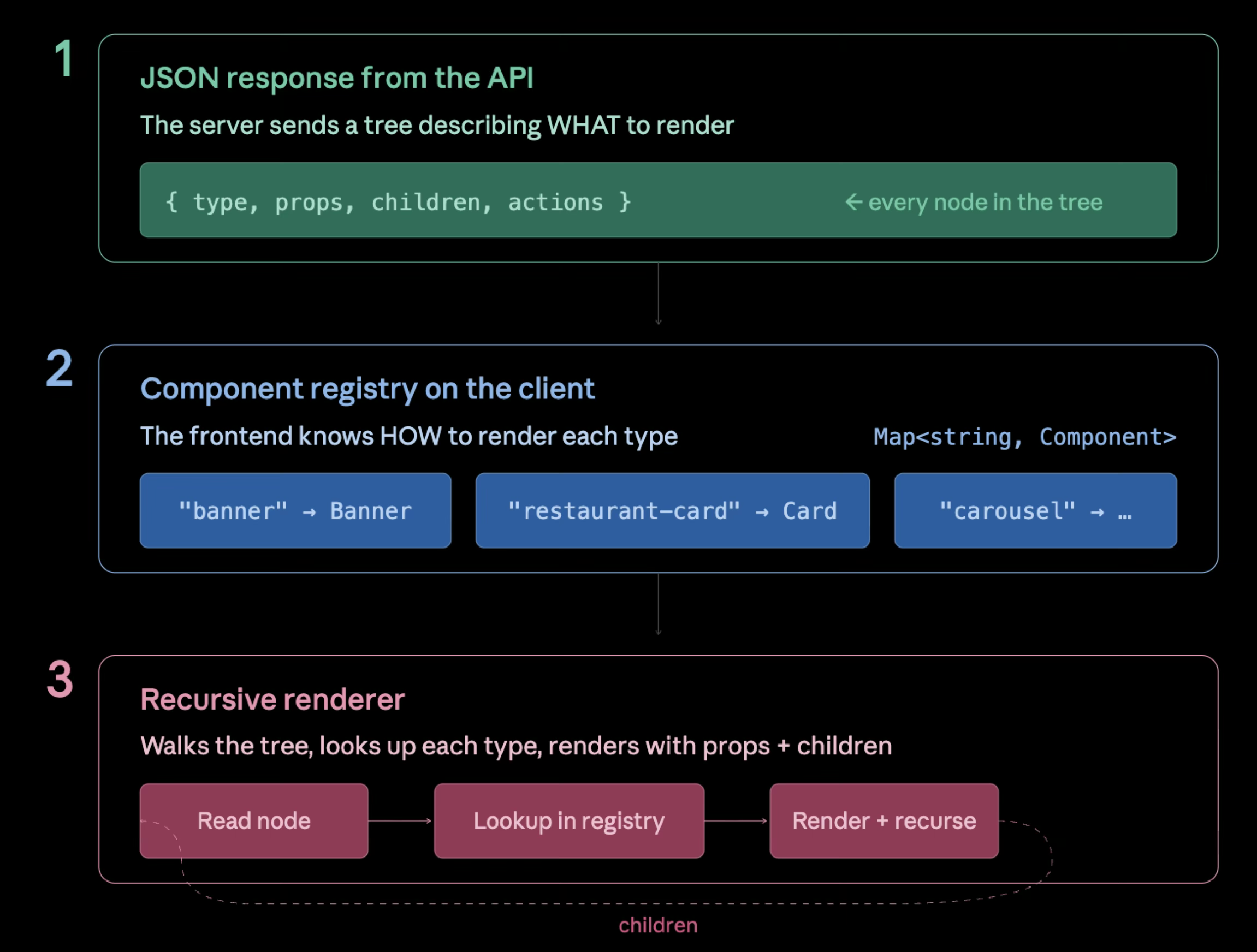
The whole pattern has 3 parts. The JSON, the Registry and the Renderer.
The clients stop knowing what a store page looks like. They render whatever the server hands them with the only constraint is that every node in the tree maps to a component the client has already shipped.
The web team still owns React. The mobile teams still own their stack.
The product team picks the layout via config (or admin panel).
And then every client implements its own renderer in its own language.
The JSON tree
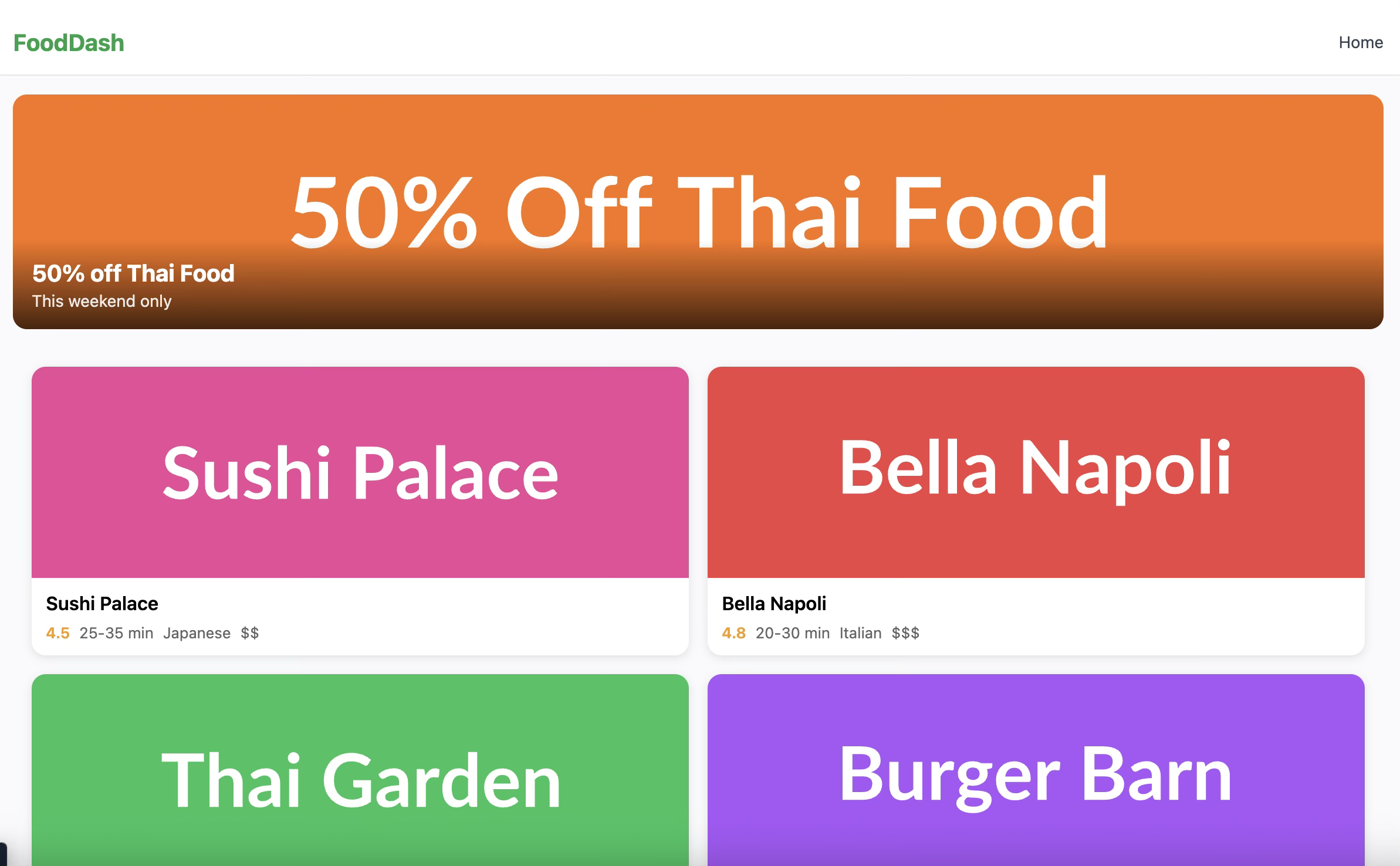
Here’s what the home page looks like as a JSON response from the server that might produce the following result:
{
  "version": 1,
  "type": "list",
  "children": [
    {
      "type": "banner",
      "props": {
        "imageUrl": "https://placehold.co/800x300/f97316/white?text=50%25+Off+Thai+Food",
        "title": "50% off Thai Food",
        "subtitle": "This weekend only"
      },
      "actions": [{ "type": "navigate", "payload": { "to": "/restaurant/3" } }]
    },
    {
      "type": "grid",
      "props": { "columns": 2 },
      "children": [
        {
          "type": "restaurant-card",
          "props": { "name": "Sushi Palace", "rating": 4.5, "cuisine": "Japanese" },
          "actions": [{ "type": "navigate", "payload": { "to": "/restaurant/1" } }]
        }
      ]
    }
  ]
}
That JSON flows through the renderer and turns into a React tree. The mapping is one-to-one:
   JSON tree (server)         Registry lookup            React tree (client)

   list                       list   → ListLayout         <ListLayout>
    ├─ banner                 banner → Banner               <Banner />
    └─ grid                   grid   → GridLayout           <GridLayout>
        ├─ restaurant-card    card   → RestaurantCard         <RestaurantCard />
        └─ restaurant-card                                    <RestaurantCard />
                                                            </GridLayout>
                                                          </ListLayout>
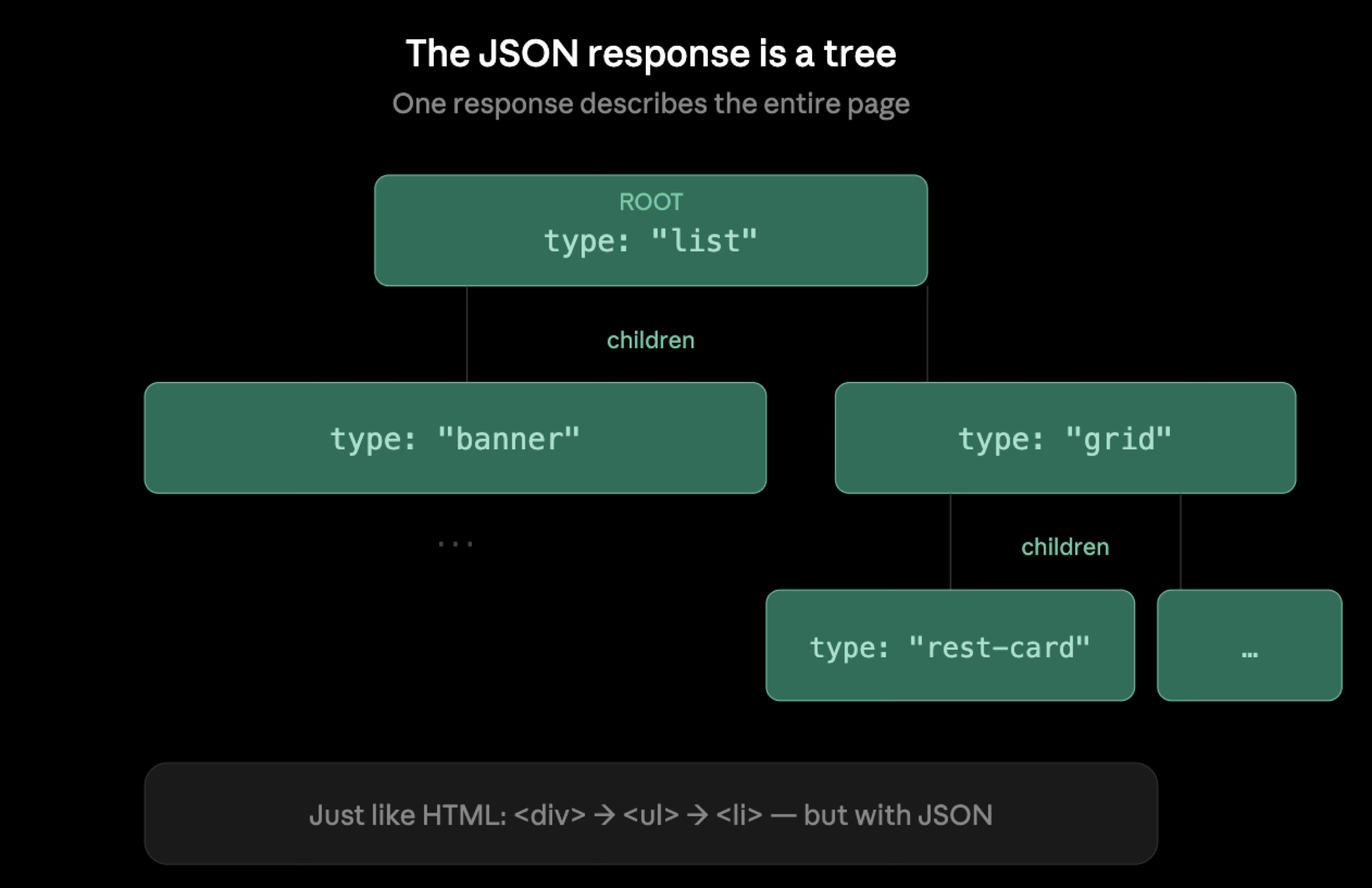
That JSON is the entire contract between server and client.
Every node in the tree, including the root, has the same four-field shape: a type that names the component, optional props that configure it, optional children that nest under it, and optional actions that fire when the user interacts with it.
A few things to watch out for when designing the contract.
type is the name of a component the client already knows. It’s a string the server controls and the client maps to a registered React component. "banner", "restaurant-card", "grid", "list" in the example above.
props is whatever data that component needs to render. A banner needs an imageUrl, title, subtitle. A restaurant-card needs a name, rating, and cuisine. A grid needs columns. The shape of props is per-component and lives wherever you define the component, not in the tree’s top-level interface.
children is how layout nests. A grid holds restaurant-cards. A list holds banners and grids. Container components (list, grid, tabs, section) declare children; leaf components (banner, restaurant-card) usually don’t.
actions describe behavior as data. When the user taps a banner, what happens? Navigate somewhere, fire a tracking event, add something to a cart, open a modal.
Here are some things to be aware of with API as a configuration approach:
The server can add new component types without breaking old clients, but only if you design for it.
If next quarter you ship a live-auction-card and a user is still running last quarter’s mobile version, that user’s client doesn’t recognize the new type but it wont break his implementation.
Changing the shape of an existing node is the dangerous case.
If restaurant-card used to take rating: number and you want rating: { score: number; count: number }, every client still in the wild on the old shape will break the moment you ship the new one.
For this we need contract versioning. Bump the version field on the root node, and have the server emit both shapes during a transition window: old clients read version: 1 and the legacy rating: number; new clients read version: 2 and the new object.
Remove the old version only when install metrics say the long tail of users on the old build is small enough to ignore.
App versions can hang around on real phones for months.
Which leaves one question for the client: how does it know what component to draw for type: "banner" ?
The component registry
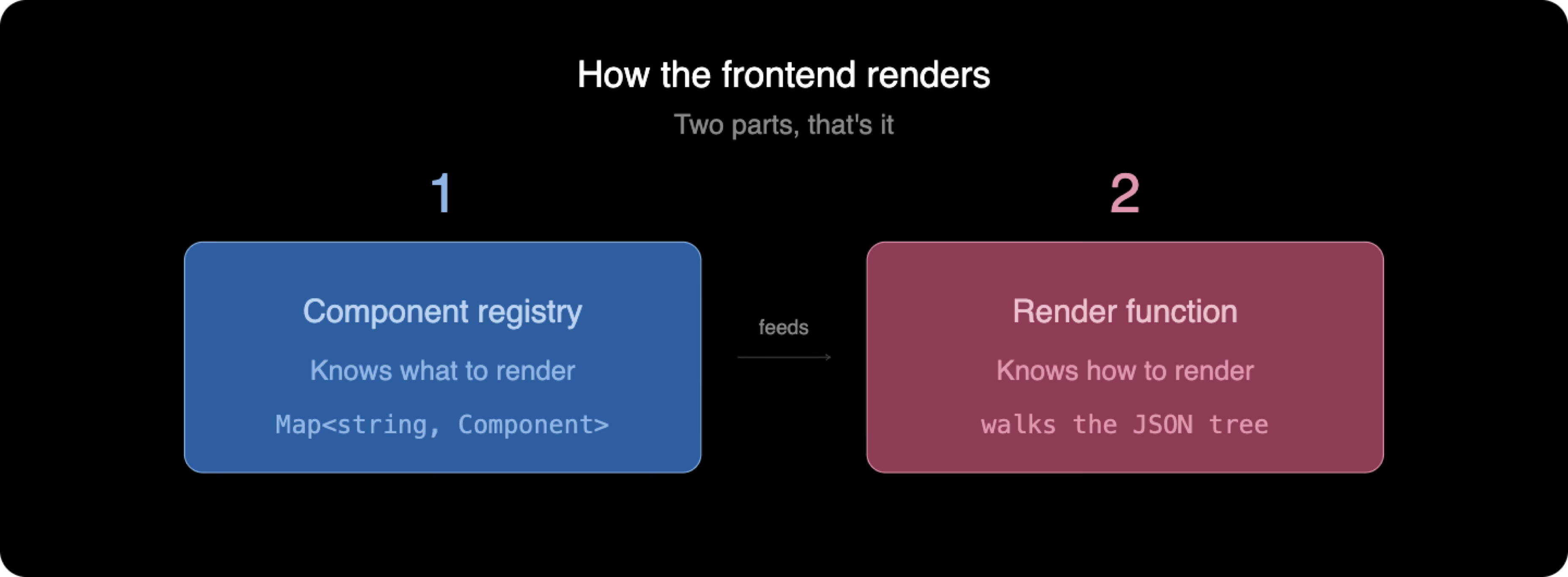
The registry is a map from string to React component.
It’s very simple. It’s only responsability is to map all components available for the SDUI page and given a string input to return the correct component.
import type { SDUIComponentProps } from './types';

export class ComponentRegistry {
  private components = new Map<string, React.ComponentType<SDUIComponentProps>>();

  register(type: string, component: React.ComponentType<SDUIComponentProps>): void {
    this.components.set(type, component);
  }

  get(type: string): React.ComponentType<SDUIComponentProps> | undefined {
    return this.components.get(type);
  }

}
You build the registry once at app startup by registering every component that the API is allowed to request.
import { ComponentRegistry } from './core/ComponentRegistry';
import { Banner } from './components/Banner';
import { RestaurantCard } from './components/RestaurantCard';
import { GridLayout } from './components/GridLayout';
import { ListLayout } from './components/ListLayout';

export const registry = new ComponentRegistry();

registry.register('banner', Banner);
registry.register('restaurant-card', RestaurantCard);
registry.register('grid', GridLayout);
registry.register('list', ListLayout);
Web and React Native can share this exact file (both are TypeScript). Native iOS does the equivalent in Swift, mapping "banner" to a SwiftUI View.
Android does it in Kotlin, mapping to a Composable.
The renderer
This is the function that converts a JSON node into React.
import type { SDUINode } from './types';
import type { ComponentRegistry } from './ComponentRegistry';

interface SDUIRendererProps {
  node: SDUINode;
  registry: ComponentRegistry;
}

export function SDUIRenderer({ node, registry }: SDUIRendererProps) {
  const Component = registry.get(node.type);
  if (!Component) return null;

  const children = node.children?.map((child, i) => (
    <SDUIRenderer key={i} node={child} registry={registry} />
  ));

  return (
    <Component {...node.props} actions={node.actions}>
      {children}
    </Component>
  );
}
The renderer looks up the component, recurses into its children, and renders the component with the node’s props and the rendered children. (Index keys are okay here because nodes don’t reorder within a parent; the server controls the order.)
The trick is the spread on the Component element. The renderer doesn’t know what props each component needs, so it spreads whatever the server sent.
A production renderer adds error boundaries per node so a single bad component doesn’t blank the whole tree, plus registry-miss logging, action-dispatcher wiring, and lazy-loaded chunks.
Actions are data
The actions key in the JSON response controls behavior. Modern apps are interactive, we need to know what happens when our components are clicked, or when they rendered on the page.
{
  "type": "banner",
  "actions": [
    { "type": "navigate", "payload": { "to": "/restaurant/3" } },
    { "type": "track", "payload": { "name": "banner_tap", "props": { "id": "thai" } } }
  ]
}
Actions describe behavior as data. The server says, “When this is tapped, navigate to /restaurant/3 and fire a track event.” The client interprets the action and calls its router and its analytics SDK.
Here’s the naive way to handle it, taken straight from the demo’s Banner component.
import { Link } from 'react-router-dom';

const navigateAction = actions?.find((a) => a.type === 'navigate');
if (navigateAction) {
  return <Link to={navigateAction.payload.to as string}>{content}</Link>;
}
Fine for one action type. But notice what find does: it returns the first matching action and stops. If we had multiple actions, they wouldn’t fire, and in production, you usually want more like analytic events to also trigger on click.
What I like to do is to create a custom hook where we handle all the action types.
import { useCallback } from 'react';
import { useNavigate } from 'react-router-dom';
import { useCart } from './CartContext';
import { useAnalytics } from './analytics';
import type { SDUIAction } from './types';

export function useActionDispatcher() {
  const navigate = useNavigate();
  const cart = useCart();
  const analytics = useAnalytics();

  return useCallback((actions: SDUIAction[] = []) => {
    for (const action of actions) {
      switch (action.type) {
        case 'navigate':
          navigate(action.payload.to);
          break;
        case 'add-to-cart':
          cart.add(action.payload.id);
          break;
        case 'track':
          analytics.event(
            action.payload.name,
            action.payload.props,
          );
          break;
      }
    }
  }, [navigate, cart, analytics]);
}
The component that consumes it shrinks to two lines.
const dispatch = useActionDispatcher();
return <button onClick={() => dispatch(actions)}>{content}</button>;
Components stop knowing about action types. Adding a new one is a one-handler change inside the dispatcher.
type SDUIAction =
  | { type: 'navigate'; payload: { to: string } }
  | { type: 'add-to-cart'; payload: { id: string } }
  | { type: 'track'; payload: { name: string; props?: Record<string, unknown> } };
You can extend this dispatcher to tag every event it fires with a fingerprint of the layout the user saw.
Once it’s in, your analytics can answer “did conversion drop on layout A versus layout B?” without setting up a separate experiment platform.
Where this fits, and where it doesn’t
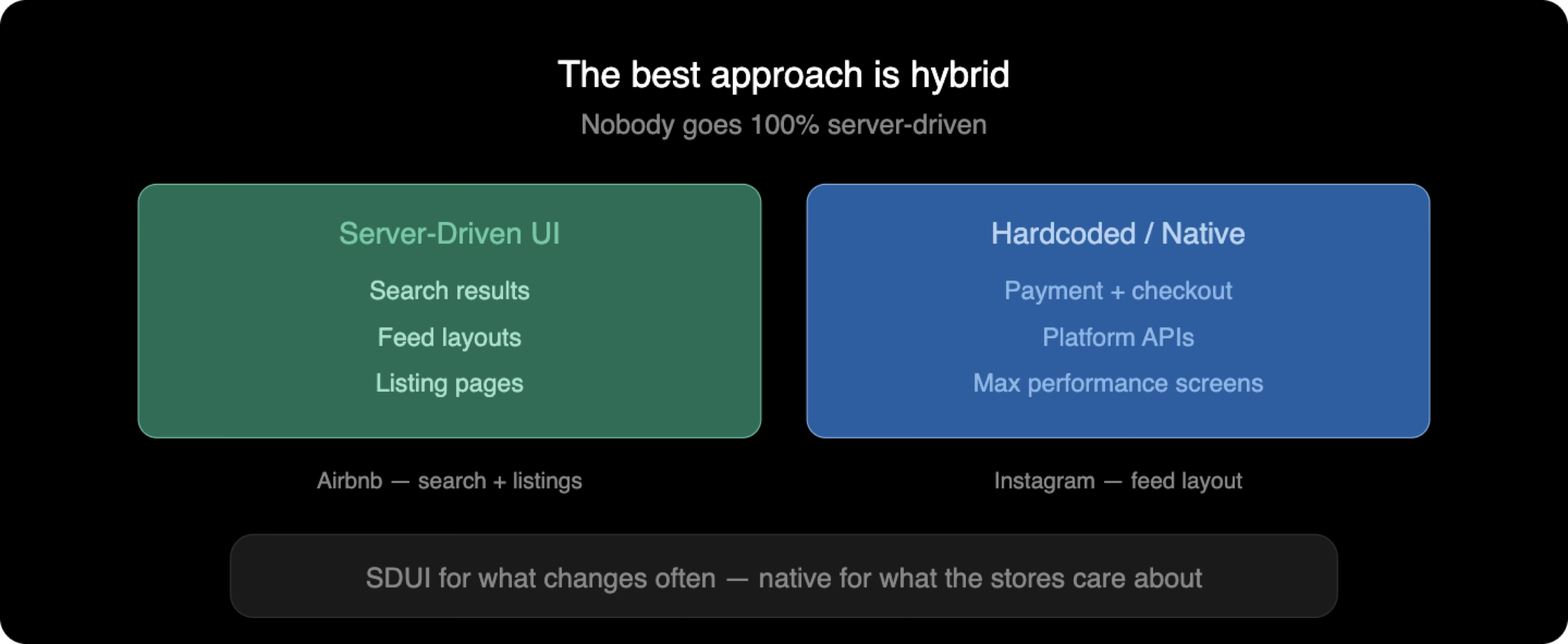
Use Server-Driven UI for screens that change frequently or vary by entity, such as discovery and search results, promotional layouts, and per-merchant configurations, as in the Glovo case at the top.
The biggest payoff is that layout experiments stop being dependant on releases and become config flips.
On the web, the same renderer runs on the server too. With Next.js or Remix, you fetch the tree at request time and ship the chosen layout in the initial HTML.
Trees cache like any JSON response, with one issue.
If you personalize per cohort (German users, beta testers, a single customer who pays for their own slice, which the industry calls a tenant), the URL or cache identifier needs to encode that cohort, otherwise the wrong group gets a tree meant for someone else.
Don’t cache personalized-per-user trees at the CDN at all: the variations explode, and the cache stops being useful. If you want to dig into cache headers and stale-while-revalidate, I wrote about that when my Netlify bandwidth bill went sideways.
Don’t use SDUI for the auth handshake or for screens that must work offline. The pattern requires the server to be reachable on every render.
When the server isn’t there, you get a black screen.
Airbnb shipped a server-driven rendering layer that powers their listing and search surfaces. Their model splits the contract into three parts (sections, screens, actions) rather than a single recursive node tree. The decomposition is cleaner; the underlying idea is the one above.
The Apple problem
One big misconception about this pattern people think is that its illegal. That Apple or Google Play stores wont allow it because it breaks the guidelines.
If you are building an app, Apple and Google have opinions on what gets past the store review. Server-Driven UI falls into one of those opinions, and that opinion is friendlier than most developers think.
For Apple the clause that matters is section 3.3.1(B) of the Apple Developer Program License Agreement (DPLA, the contract every iOS developer signs to ship to the store), titled “Executable Code.”
Interpreted code may be downloaded to an Application but only so long as such code: (a) does not change the primary purpose of the Application by providing features or functionality that are inconsistent with the intended and advertised purpose of the Application (b) does not bypass signing, sandbox, or other security features of the OS; and (c) for Applications distributed on the App Store, does not create a store or storefront for other Applications.
Three conditions, and SDUI naturally meets all three.
- Your food-delivery app stays a food-delivery app no matter how the layout shuffles.
- The renderer doesn’t touch signing or the sandbox; it reads JSON and dispatches to registered components.
- And you’re not building an App Store inside your app.
The thing the registry buys you is condition (a). Components have to be registered on the client, so the server can’t conjure new functionality at runtime.
It can only rearrange what’s already there.
Rejection risk depends on how aggressive the variations get. Apple won’t notice if you move a button or reshuffle a list.
The casino-through-the-JSON-tree case is where reviewers start asking questions. (Although I am very much not a lawyer. If you ship into a regulated category, read the policy yourself)
Google Play’s Dynamic Code Loading guidance reads more or less the same.
So dont be scared, try it out, and let me know if it fits what you are building.
P.S. If you want to learn more about SDUI (the admin panel that flips the layout, the SSE channel that pushes the change to all clients in 200ms, the hybrid pattern for keeping checkout native) and other architecture patterns, I’m running a four-hour deep dive on this and four other system-design topics on May 28.
Sources
- Apple Developer Program License Agreement, interpreted-code clause
- Microsoft
react-native-code-push, App Center retirement notice - Microsoft
code-push-server, self-host alternative (archived) - Expo EAS Update, the React Native OTA path

Discover more from The Neciu Dan Newsletter
A weekly column on Tech & Education, startup building and occasional hot takes.
Over 1,000 subscribers


